ElevenLabs vs Murf for training videos, explainers and demos: voice realism, languages, cloning and consent, editing, commercial rights, October 2026 pricing and what each does with your voice and scripts.
AI for Data
Last updated: October 2026.
You have a script for a five-minute training video, a deadline on Friday and no budget for a voice actor. You have heard that ElevenLabs sounds the most human and that Murf is the one L&D teams use, and both have a free plan. Which one should you spend your afternoon on?
We went through both tools’ current pricing pages, help centres, terms and privacy policies (October 2026) so you can choose on facts rather than on sponsored “top 10” lists, many of which are affiliate pages written against old pricing.
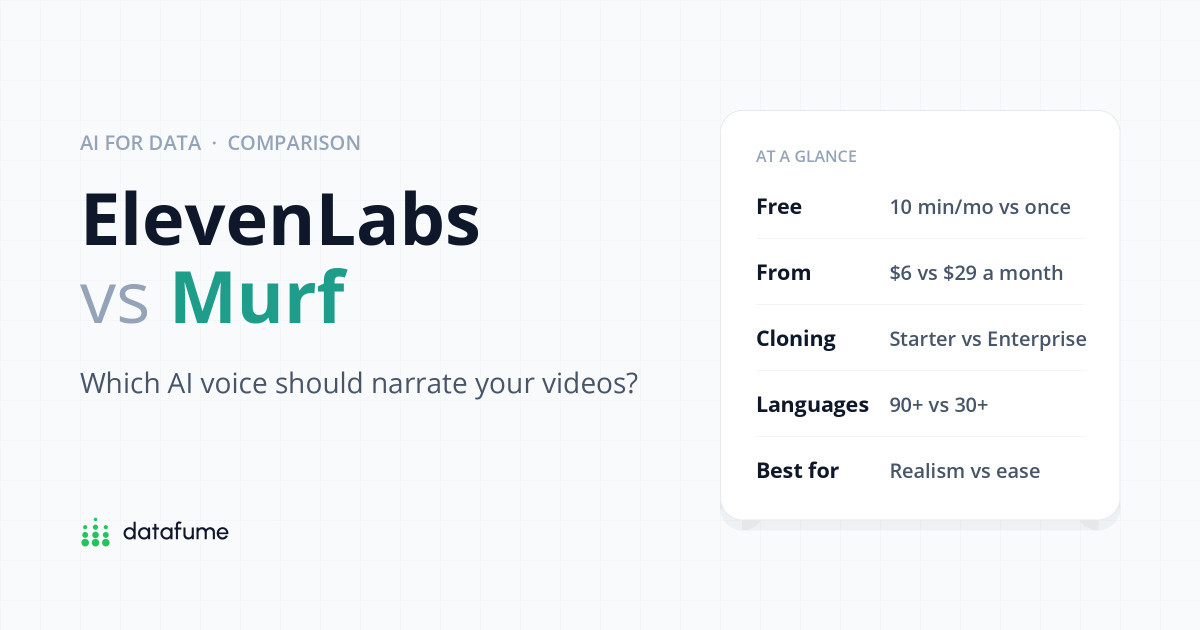
Short answer: Choose ElevenLabs if the most natural, expressive voice matters most, you need many languages, or you want to clone your own voice on a small budget; its paid plans start at $6 a month. Choose Murf if you want a calm, block-by-block editor for training videos and slide decks, with fixed hours of voice time and PowerPoint and Google Slides add-ons on the Business plan. Neither free plan allows commercial use, and Murf’s free plan does not let you download at all.
| ElevenLabs | Murf | |
|---|---|---|
| Best for | Realistic, expressive narration; many languages; voice cloning | Training videos and slides edited block by block |
| Free plan | 10,000 credits a month (about 10 minutes), downloads allowed | 10 minutes in total, no downloads |
| Commercial use on free | No, and published content must credit ElevenLabs | No |
| Cheapest paid plan | Starter, $6/month (about 30 minutes) | Creator, $29/month or $19/month billed yearly (2 hours a month) |
| Languages | 90+ on its newest model | 30+ languages and accents, 200+ voices |
| Voice cloning | Instant cloning from Starter, professional cloning from Creator | Enterprise add-on only |
| Team seats | 3 on Scale, 10 on Business | 1 editor until Enterprise |
| Trains on your data? | Yes by default; anyone can switch it off | Privacy policy is silent; “no training” is promised for Enterprise |
Scorecard
ElevenLabs vs Murf, category by category
DataFume rating from 1 (weak) to 5 (excellent)
Both tools have moved well past the robotic sat-nav voice. The difference is in approach.
ElevenLabs is built around expressive models that read context: a question sounds like a question, an aside drops in pitch, and you can steer delivery with tags and settings such as stability and speed. Its model page lists Eleven v4 as the flagship for “highest quality and expressiveness”, with older models such as Multilingual v2 still offered because they are steadier on very long narration. The upside is a voice that can genuinely pass for a person. The downside is that expressive models occasionally over-act or vary between takes, so you will sometimes regenerate a sentence.
Murf aims for consistency. Its 200+ stock voices are polished and even, with “styles” (conversational, promotional, newscast and so on) and fine controls for pitch, speed, pauses and pronunciation. Emphasis, variability and a feature called “Say It My Way” are on the Business plan and above. For compliance training or a product walkthrough, that predictability is a feature, not a flaw. For an emotional brand story, ElevenLabs usually has the edge.
Test with your own script, not the demo text. Paste the trickiest paragraph you have, with product names, acronyms and numbers, into both free plans. How each tool handles “SQL”, “Q3” and your company name tells you more than any review.
ElevenLabs is the clear winner on reach. Its documentation lists 90+ languages for Eleven v4 and 70+ for Eleven v3, and the same voice can usually switch language while keeping its character, which helps if you localise one course into several markets.
Murf’s plan table lists 30+ languages and accents (its API page says 35+), including several English accents such as British, American, Australian, Indian and Scottish. That covers most corporate training needs, but if you need, say, Bengali, Swahili or Ukrainian narration, check Murf’s voice library before you commit.
This is where the two tools differ most for small teams.
Cloning someone’s voice without their permission can break platform rules and, in many countries, the law. Get written consent from anyone whose voice you clone, keep it on file, and agree in writing how and where their cloned voice may be used.
Murf’s studio splits your script into blocks. Each block gets a voice, and you adjust pitch, speed, pauses and pronunciation per block. You can upload a video or slides and drag blocks along the timeline so each line starts when the screen changes, which is exactly what a training video needs. A useful detail from Murf’s FAQ: changing the voice, style, pitch, speed, pauses or pronunciation of text you have already generated does not use up voice time. Only new or edited text counts. Creator includes a Canva integration; PowerPoint and Google Slides add-ons come with Business.
ElevenLabs Studio has two modes. Audio projects are organised into chapters, handy for a course with many modules. Video projects give you a multi-track timeline with narration, music, sound effects and captions you can burn into the export. You can regenerate a single paragraph or a few words, keep earlier takes in a history, lock finished paragraphs, and build a pronunciation dictionary for brand names. Its help pages say you get two free regenerations of unchanged text before credits are charged. Read-only review links let a stakeholder leave timestamped comments without an account.
In practice, Murf feels calmer for someone who has never edited audio. ElevenLabs feels more like a production tool: more power, more settings to learn.
The two charge differently. ElevenLabs sells credits; its pricing page estimates roughly 1,000 credits per minute of speech, though the exact rate depends on the model. Murf sells hours of voice generation. Here is what you pay on monthly billing, in US dollars before tax:
| Plan | Monthly | Billed yearly | Voice included | Commercial use |
|---|---|---|---|---|
| ElevenLabs Free | $0 | n/a | 10,000 credits (~10 min) a month | No |
| ElevenLabs Starter | $6 | $60/year | 30,000 credits (~30 min) | Yes |
| ElevenLabs Creator | $22 | $220/year | 121,000 credits (~2 hours) | Yes |
| ElevenLabs Pro | $99 | $990/year | 600,000 credits (~10 hours) | Yes |
| ElevenLabs Scale / Business | $299 / $990 | $2,990 / $9,900 | 1.8M / 6M credits | Yes |
| Murf Free | $0 | n/a | 10 minutes in total, no downloads | No |
| Murf Creator | $29 | $19/month ($228/year) | 2 hours a month (24 hours a year on annual) | Yes, personal licence |
| Murf Business | $99 | $66/month ($792/year) | 8 hours a month (96 hours a year on annual) | Yes, business licence |
| Murf Enterprise | Custom quote | Unlimited | Yes, plus broadcast rights add-on | |
Cost
What you pay each month
Monthly billing, US dollars before tax, with voice time included
Sources: elevenlabs.io/pricing and murf.ai/pricing, checked October 2026. Yearly billing is cheaper: ElevenLabs gives two months free; Murf Creator drops to $19 and Business to $66 a month.
For a light user, ElevenLabs is far cheaper to start: $6 gets you commercial rights and about half an hour of audio. At the heavy end the two converge: around $99 a month buys roughly 8 to 10 hours on either. Two details change the sums. Murf does not charge for re-rendering existing text with a different voice or speed, which suits teams who tweak a lot. And Murf’s own FAQ says registered businesses should choose Business rather than Creator, so a company’s real starting price is $66 to $99 a month.
If several people will edit voiceovers, look closely. ElevenLabs’ Scale plan ($299) includes 3 seats and Business ($990) includes 10. On Murf, both Creator and Business allow one editor; sharing projects, unlimited viewers, access control, private folders and SSO are all Enterprise features. A three-person L&D team on Murf therefore either shares one login, which breaks most terms of service and is a security risk, or talks to sales.
Scripts often contain unreleased product details, and voice recordings are biometric-style data. Here is what each company says.
ElevenLabs (privacy policy updated 9 October 2026) says it uses personal information, which can include your text, voice inputs and outputs, “to research, build, train and improve our AI models”. You can switch this off: profile icon → Terms and privacy → Data use, then turn off “Improve the models for everyone”. ElevenLabs says anyone can opt out on any plan, but it only affects data submitted afterwards. Enterprise customers are excluded from training by default. Data it generates about your voice is kept for no longer than three years after your last interaction, unless law requires otherwise.
Murf‘s privacy policy (last updated November 2023) does not mention AI training either way; it says information you provide is used “to provide our products and services”, and that uploaded projects, media and text are deleted within 30 days of closing your account, with the usual legal exceptions. Its terms limit Murf’s licence to your content to running the service. However, its pricing page lists “No Training on your Data” as an Enterprise feature, with the note that Murf “does not train its AI models on any enterprise data”. It does not say what happens to data on the Free, Creator and Business plans. If that matters to you, ask Murf in writing before you upload anything sensitive.
Whichever tool you choose, keep confidential details out of scripts until the content is ready to be public, and turn off training where you can. For more on how cloud services handle your files, see our guide on whether cloud storage is safe.
Decision guide
Four questions to pick your voice tool
Start at the top. Stop at the first yes.
For voice realism, language range and cloning, yes. For simple, predictable editing of training videos and slides by one person, Murf is often easier. “Better” depends on whether you value expressiveness or control.
Not commercially. ElevenLabs’ free plan has no commercial licence, and published free-plan content must credit “elevenlabs.io” or “11.ai” in the title. Murf’s free plan does not allow downloads, so you cannot publish anything from it.
ElevenLabs is cheaper to start, at $6 a month with commercial rights. At around $99 a month both give roughly 8 to 10 hours of voice, and Murf’s annual billing ($66 a month for Business) brings it below ElevenLabs Pro for heavy users.
Yes, but as of October 2026 only as a custom add-on on Enterprise plans, arranged through Murf’s sales team. ElevenLabs includes instant cloning from its $6 Starter plan.
ElevenLabs does by default but lets anyone opt out under Terms and privacy → Data use, and excludes Enterprise customers by default. Murf’s privacy policy does not mention training; it explicitly promises no training only for Enterprise data.
Yes, in both. In Murf, re-rendering existing text with a different voice, speed or pitch does not use generation time. In ElevenLabs, replacing a voice marks paragraphs for regeneration, which uses credits after the free regenerations.
Looking for something free to start with? Read our round-up of the best free AI voice generators, and check whether ElevenLabs is safe for your recordings. If you are building AI into your wider workflow, see what ChatGPT can and can’t do for data analysis and what happens to your data if a cloud service shuts down.
Keep reading
Short, free guides that take you from zero to your first real analysis. No sign-up needed.

Join our newsletter for new data guides, tool reviews and free resources.
By subscribing you agree to our Privacy Policy and consent to receive emails from DataFume.
© 2026 DataFume. All rights reserved.