Cloud services do close. We look at real shutdowns, from Nirvanix to Amazon Drive, how much notice users got, what terms of service and GDPR promise, and a checklist to keep your files safe.
Cloud & Security
Last updated: October 2026. Dates and notice periods below come from the companies’ own announcements and contemporary reporting; sources are named in the text.
Maybe it is the notes app that holds ten years of your thinking. Maybe it is a photo service, a small backup tool or the cloud drive your freelance clients upload to. One day an email arrives with a subject line like “An important update about your account”, and you realise you never asked the obvious question: what happens to my data if this company stops?
Cloud services do shut down, including ones run by the biggest companies in the world. The good news is that most give you time to get your files out. The bad news is that “most” is doing a lot of work in that sentence. This guide looks at real shutdowns, how much warning people got, what the law says and what you can do now so a closure is an inconvenience rather than a loss.
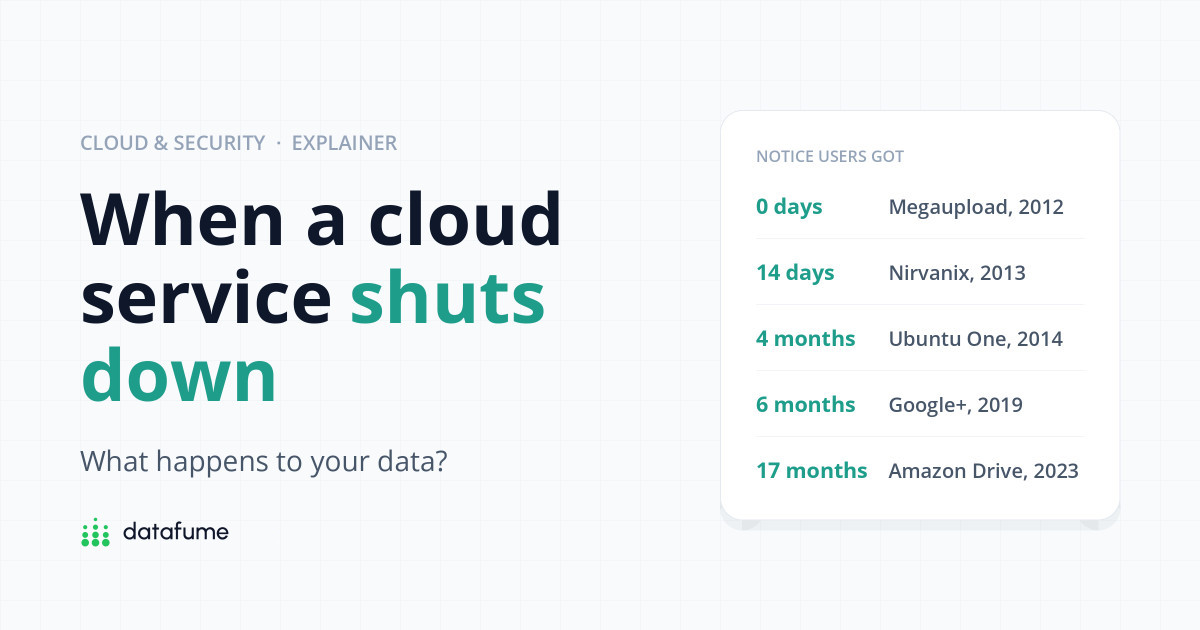
Short answer: When a cloud service shuts down, it usually announces a date, stops new uploads, gives you a window to download your data and then deletes everything. Notice has ranged from more than a year (Amazon Drive) to about two weeks (Nirvanix) to none at all (Megaupload, seized by authorities). Your files are only safe if you already have a copy somewhere else. Export regularly, prefer open file formats and keep a 3-2-1 backup.
Planned shutdowns tend to follow the same pattern:
The difference between a calm migration and a lost archive is how long step 3 lasts, and whether you notice the email in time.
Timeline
When cloud services closed their doors
Seven shutdowns and the warning users got
Nirvanix was not a consumer app. It sold cloud storage to businesses, and companies including IBM, Dell and HP resold its storage inside their own products. On 16 September 2013 it told customers they had until 30 September to move their data, as reported by eWeek and others. It filed for bankruptcy on 1 October. Two weeks is barely enough time to copy a large archive over the internet, and it is the case people in the industry still quote when they talk about provider risk. Being a business customer did not buy anyone extra time.
Canonical, the company behind Ubuntu Linux, announced on 2 April 2014 that it was closing its Ubuntu One file service because keeping it competitive needed “more investment than we are willing to make”. File services stopped on 1 June, but users could still download their files until 31 July, when everything was deleted. Annual subscribers were refunded for unused time. That is roughly what a good shutdown looks like: clear dates, a read-only grace period and refunds.
Barracuda Networks announced at the start of February 2016 that Copy, its cloud storage and sync service, would close on 1 May, with files deleted on that date. It partnered with the transfer service Mover to help people move files elsewhere. A few months later Bitcasa, which had once sold “unlimited” storage, emailed consumer users in late April telling them to download everything by 20 May 2016, after which accounts and data would be permanently deleted. Same year, same kind of product: one gave about three months, the other about one.
Google announced in October 2018 that it would close the consumer version of Google+, originally in August 2019. After a second security bug, it brought the date forward, and deletion of consumer content began on 2 April 2019. Google pointed users to its Takeout export tool and said photos and videos backed up in Google Photos would not be deleted. If you had planned to “deal with it next summer”, the deadline moved four months closer.
Amazon emailed Amazon Drive users in July 2022 to say it would stop supporting the service on 31 December 2023 and focus on Amazon Photos. Uploads through the website ended on 31 January 2023. Photos and videos were moved to Amazon Photos automatically, but other files, such as documents and spreadsheets, had to be downloaded before the end date. Seventeen months is generous, and still some people will have missed the email.
Not every closure is a business decision. In January 2012 US authorities seized Megaupload’s servers as part of a copyright case. Ordinary users who stored legitimate files there lost access immediately. The Electronic Frontier Foundation went to court on behalf of one of them, a sports videographer named Kyle Goodwin, to try to get his work back; years later, EFF said the data was still sitting on servers in a warehouse. It is an extreme case, but it shows the worst outcome is not a short notice period. It is none.
Notice period
How long users had to get their data out
Days from announcement to the end of the download window (approximate)
Counted from the first public announcement or customer email to the final deletion or download deadline, using dates reported at the time. Google+ counts from the October 2018 announcement.
Very little, usually. Most terms of service let the company change or end the service, and they rarely commit to a specific number of days’ notice.
Google’s terms are a fairly typical example of a big provider’s promise. They say that if Google stops offering a service, it will “provide you with reasonable advance notice”, except in urgent situations, and give you a chance to export your content using Google Takeout. “Reasonable” is not defined. Smaller companies often promise less, and a company that has run out of money may not be able to keep any promise at all, as Nirvanix showed.
Paid plans sometimes come with a refund for unused time, as Ubuntu One’s annual subscribers got. Do not count on it, and do not count on compensation for the trouble of moving.
Open the terms of any service you rely on and search the page (Ctrl+F or Cmd+F) for “discontinue”, “terminate” and “export”. Two minutes tells you whether the company promises notice, an export tool or nothing.
The best defence is a good export tool you have actually tried. Google Takeout is the best-known example. At takeout.google.com you tick the Google products you want, choose how to receive the archive (a download link by email, or delivery to Google Drive, Dropbox, OneDrive or Box) and pick a file type and maximum size. According to Google’s help pages:
Other services call it “Export”, “Download your data” or “Backup” in their settings. Whatever it is called, check two things: does it include everything (attachments, comments, folder structure), and does it produce files another app can open?
If you live in the UK or the EU, data protection law gives you some leverage.
The right to data portability. Under Article 20 of the GDPR (and the UK GDPR, which copies it), you can ask for the personal data you have given a company in a “structured, commonly used and machine-readable format”, and in some cases have it sent straight to another provider. The UK’s Information Commissioner’s Office explains that this applies where the company processes your data based on your consent or a contract, and is done by automated means, which covers most cloud services. Companies generally have one month to respond.
The right has limits. It covers personal data you provided, not every file in every format, and it does not force a company to keep running. If a business collapses overnight, a legal right to your data is cold comfort if nobody is left to answer the request.
The EU Data Act. Since 12 September 2025, the EU Data Act has required cloud providers in the EU to make switching to another provider easier: notice periods of no more than two months to start a switch, a transition period of normally no more than 30 days to move your data, and switching charges limited to cost until they are banned entirely from 12 January 2027. It matters most for businesses, and it does not apply in the UK, but it is a sign that “you can always take your data with you” is becoming a legal expectation rather than a courtesy.
Laws help you get your data out. They do not keep it safe if the company disappears first. Only your own copy does that.
Shutdowns rarely come entirely out of the blue. Signals worth noticing:
None of these means the end is certain. Each is a good prompt to run an export this week rather than “some time”.
Checklist
Shutdown-proof your cloud data
Do these once, then repeat the export on a schedule
The single most useful step is number 3. If your files already live in three places, a shutdown email is a to-do item, not an emergency. Our 3-2-1 backup rule guide shows a simple way to set that up, and a dedicated backup service such as those in our Backblaze vs IDrive comparison can be your off-site copy.
Sometimes. Ubuntu One refunded annual subscribers for unused time, for example. But terms of service rarely guarantee it, and a company that has gone bankrupt may not be able to pay. Treat any refund as a bonus.
It can happen, especially if the company fails suddenly or its servers are seized, as with Nirvanix’s two-week deadline and Megaupload’s overnight closure. Big providers usually promise “reasonable advance notice”, but even that wording leaves room for short windows.
In planned closures, the company normally deletes accounts and files after the deadline, as Ubuntu One, Copy and Bitcasa all said they would. If the company is sold rather than closed, many privacy policies allow user data to be transferred to the buyer, so read the announcement carefully.
If you are in the UK or EU, the right to data portability lets you request the personal data you provided in a machine-readable format, and companies normally have a month to respond. It does not cover every situation, and it cannot help if there is nobody left at the company to answer.
Big providers have more resources and usually give longer notice, as Amazon Drive’s 17 months showed. But they also close products: Google+ is one of many. Size lowers the risk of a sudden collapse; it does not remove the risk of a product being discontinued.
Want to know the other ways cloud data goes missing? Read Is cloud storage safe? Real ways people lose data. Then set up your safety net with our 3-2-1 backup rule guide, and if you are choosing an off-site backup, compare Backblaze vs IDrive.
Keep reading
Short, free guides that take you from zero to your first real analysis. No sign-up needed.

Join our newsletter for new data guides, tool reviews and free resources.
By subscribing you agree to our Privacy Policy and consent to receive emails from DataFume.
© 2026 DataFume. All rights reserved.