What Google actually scans in Drive, what it promises not to do with your files, real cases where scanning went wrong, and how to keep sensitive files private.
Cloud & Security
Last updated: October 2026.
Maybe you have just uploaded scans of your passport, a tax return or some medical letters, and a thought lands: can Google see this? Perhaps you read about someone who lost their whole Google account over a photo, or saw a post claiming Google is feeding your files to its AI. Now you are wondering whether to move everything somewhere else.
The short version is that Google does scan your files, but mostly by machine, for specific reasons, and not in the way the scariest headlines suggest. This guide explains what Google’s own policies say it checks, what it says it does not do, the real cases where scanning went wrong, and what you can do if you would rather nobody, Google included, could read certain files.
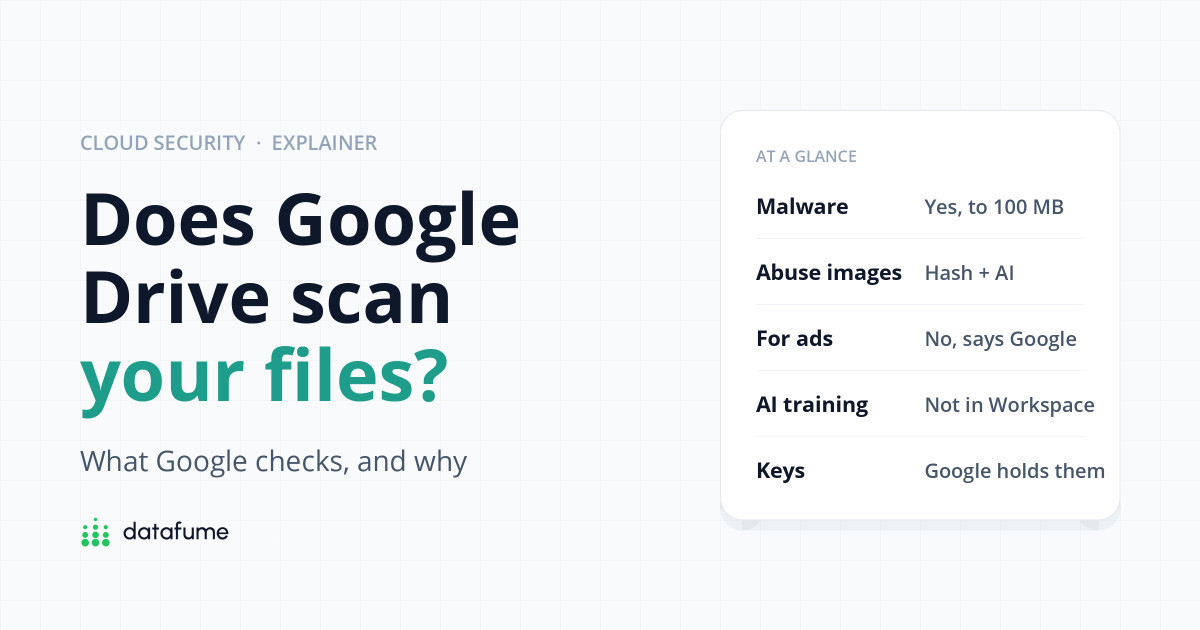
Short answer: Yes. Google’s automated systems analyse files in Google Drive to detect malware, spam, phishing and child sexual abuse material, to enforce its content policies on shared files, and to power search and smart features. Google says it does not use Drive content to show you personalised ads, and that Gemini in Workspace apps does not use your files to train its AI models. People rarely look at your files, but Google holds the encryption keys, so it can access them. For truly private documents, use an end-to-end encrypted service or encrypt files before uploading.
Google’s Terms of Service are direct about it: Google uses automated systems and algorithms to analyse your content, and that analysis happens as content is sent, received and stored. In other words, it is not just when you share a file. Here is what that analysis is for.
What’s scanned and why
Six reasons Google looks at your files
Almost all of it is automated. Humans review only flagged items.
Based on Google’s Terms of Service, Drive Program Policies and Drive help pages, checked October 2026.
According to Google’s Drive security help page, Drive scans files for viruses and malware, but there is a 100 MB scanning limit and some file types cannot be scanned at all. If a scan fails you may see a warning, and Google’s advice is to be careful opening the file. On work and school accounts, Google automatically evaluates files shared with you from outside your organisation and blocks access if it finds a problem.
Strangers can share files with any Google account, and scammers use this to send phishing links. Since May 2023, Drive has a spam view: files Google thinks are likely spam are either blocked or moved there, and anything left in spam for more than 30 days is deleted. You can also block a person from sharing with you, a feature Google added in 2021.
This is the scanning that gets the most attention. Google’s transparency report help page says it uses hash matching, including YouTube’s CSAI Match technology, to detect known abuse images, and machine learning classifiers to find material that has never been seen before. Hash matching compares a digital fingerprint of each image against a database of known illegal images; it does not “look” at your holiday photos in any meaningful sense. The AI classifiers are different: they judge what an image appears to show, which is where mistakes can happen.
When Google finds apparent CSAM, it reports it to the US National Center for Missing & Exploited Children (NCMEC), as US law requires, and can restrict the account’s access to most Google services. Google’s pages describe this as applying to content in your Google Account generally rather than naming Drive, Photos or Gmail one by one.
Drive’s Program Policies ban things like malware, spam, phishing, harassment and illegal content. Google says it may review content for violations and take action, including restricting the sharing of files or removing access to products. Drive’s additional terms add, notably, that this does not mean Google necessarily reviews content, so you should not assume it does.
To find a document by a word inside it, Google has to have read the document. Drive’s search, file suggestions and other “smart features” are built on that processing. You can control some of it: Settings › Privacy in Drive links to “Smart features in Google Workspace”, one of three separate smart-features switches described on Google’s help page. If you live in the UK, the EEA, Switzerland or Japan, these are off by default until you turn them on.
Gemini can summarise a document or answer questions about files in your Drive, and to do that it has to read them. What Google promises about that depends on the type of account:
Google does not publish a simple statement that AI only ever reads a file when you ask it to, so we would not assume that. If you do not want AI features touching your files at all, switch off the smart features settings above.
In November 2025, a viral post claimed Gmail had quietly opted everyone into AI training. Google publicly denied it, saying it had not changed anyone’s settings and does not use Gmail content to train Gemini. The smart features switches are worth checking anyway, because they decide what personal features can do with your content.
Note what is not on that list. Google does not say it never looks at your files: its automated systems do, constantly, for the reasons above.
Access
Who can see what’s in your Drive
A personal Google account, default settings
“With encryption” means files encrypted on your device before upload, for example with Cryptomator. Google can still see file sizes and upload times.
Google says Drive data is encrypted in transit (on its way between your device and Google) and at rest (on its disks); Google’s security documentation describes AES-256 encryption at the storage layer. That protects your files from someone stealing a hard drive from a data centre or intercepting your Wi-Fi. It does not stop Google, because Google owns and manages the keys. That is what makes scanning, search and previews possible.
There is one exception, and it is not available to personal accounts. Client-side encryption lets an organisation encrypt files with keys it controls, so Google’s servers cannot decrypt them. As of October 2026 it is offered on Workspace Enterprise Plus, Education Standard and Plus, and Frontline Plus. We found no announcement of end-to-end encryption for personal Google Drive. Our guide to where your cloud files physically live explains the bigger picture.
Automated scanning is usually invisible. The cases below are why people worry, and it is worth getting the details right.
In August 2022, Kashmir Hill reported in The New York Times on a San Francisco father, identified as Mark. In February 2021, during the pandemic, a nurse asked for photos of his toddler’s swollen groin ahead of a video consultation. His Android phone backed the photos up automatically to Google Photos, not Drive. Google’s systems flagged them, and two days later his account was disabled. He lost his Gmail, contacts, photos and even his phone number, which ran through Google Fi. A police investigation found no crime, but Google did not restore the account. A similar case involving a father in Houston, who had also taken photos at a paediatrician’s request, was reported at the same time.
The lesson is not that Google is reading your Drive for fun. It is that AI classifiers can misjudge innocent images, and that when they do, everything tied to your Google account can go at once. Medical photos of children are better kept off any automatic cloud backup.
In January 2022, researchers noticed that Drive was flagging small files as copyright violations, including a text file containing only the number “1”. Others reproduced it with files holding other numbers. Google said it had fixed the problem. It was a bug, not a policy, but it shows that Drive does automatically check files against its rules.
These incidents, and others, are covered in our guide to the real ways people lose cloud data.
Some scanning protects you. In late 2025 Google introduced ransomware detection in Drive for desktop: an AI model watches for files being mass-encrypted on your computer and pauses syncing so the damage does not spread to your cloud copies. It became generally available on 30 March 2026, but only on paid business plans (Business Standard and Plus, Enterprise, Education Standard and Plus, and Frontline Standard and Plus). Personal accounts get the related bulk restore feature for rolling files back, but not the automatic detection.
Decision guide
Where should this file live?
Start at the top. Stop at the first yes.
For most people, most of the time, Google Drive is fine. The files worth thinking twice about are scans of passports and ID, medical records, intimate photos, legal documents and anything you are obliged to keep confidential.
With end-to-end encryption, files are encrypted on your device and only you hold the key, so the provider cannot scan or read them. As of October 2026:
The trade-off: if you lose your password and recovery key, nobody can get your files back. That is the point, but write the recovery key down somewhere safe.
Cryptomator is open-source software that creates an encrypted “vault” inside your existing Google Drive folder. You work with files normally on your computer; Google only ever receives scrambled data. It is free on Windows, macOS and Linux. The mobile apps cost a one-off €29.99 per platform as of October 2026 (the free mobile versions can only read vaults). This is a good option if you like Google Drive but want a private corner of it.
Google’s automated systems analyse your files for malware, spam, abuse material, policy breaches and to power search and smart features. People at Google may look at specific files when something is flagged or reported, or when there is a valid legal request.
No, according to Google. Its Privacy Policy says it does not show personalised ads based on your content from Drive, Gmail or Google Photos, and Drive’s privacy page says Drive does not use your content for advertising.
Google says Gemini in Workspace apps does not use your content to train generative AI models, for both work accounts and personal accounts with a Google AI plan. Conversations in the separate Gemini app follow different rules and may be reviewed by humans, so avoid pasting confidential files there.
No, not for personal accounts. Files are encrypted in transit and at rest, but Google holds the keys. Only some business and education editions offer client-side encryption, where the organisation holds the keys.
Yes. Serious policy breaches, especially suspected child abuse material, can lead Google to disable the whole account, including Gmail and Photos. As the 2022 New York Times case showed, this can happen to innocent people and is hard to reverse. You can appeal, and Google says appeals in these cases are reviewed up to twice.
Yes. Google’s terms say its automated analysis happens when content is stored, not only when it is sent or shared. Policy enforcement such as restricting sharing mostly matters for shared files, but scanning for things like abuse material applies to your account’s content generally.
Keep reading
Short, free guides that take you from zero to your first real analysis. No sign-up needed.

Join our newsletter for new data guides, tool reviews and free resources.
By subscribing you agree to our Privacy Policy and consent to receive emails from DataFume.
© 2026 DataFume. All rights reserved.