Datawrapper or Flourish? We compare free plan limits, October 2026 pricing, chart and map types, animation, accessibility and privacy, and tell you which to pick for your situation.
Data Visualization

Last updated: October 2026.
You have a spreadsheet, a deadline and a web page or report that needs a chart (or a map) that looks professional and works on a phone. Two names keep coming up: Datawrapper and Flourish. Both are browser-based, both need no code, and both have a free plan. But they are built for different jobs, and the free plans have catches that only show up once you try to publish.
This guide compares Datawrapper and Flourish on the things that actually decide the choice: what the free plans let you publish, what paid plans cost as of October 2026, chart and map types, animation, accessibility, teams and data privacy.
Short answer: Choose Datawrapper if you need clean, accessible charts, maps and tables for articles and reports, quickly, with a generous free plan and EU hosting. Choose Flourish if you want animation and storytelling: bar chart races, interactive stories, 3D globes and charts inside Canva or PowerPoint. For most people publishing everyday charts on a website, Datawrapper is the safer default.
| Category | Datawrapper | Flourish |
|---|---|---|
| Made by | Datawrapper GmbH, Berlin | Flourish, a Canva brand (London) |
| Free plan | Unlimited charts, maps and tables; embed and PNG download | Unlimited projects; public publishing and embedding only |
| Branding on free embeds | “Created with Datawrapper” credit | Flourish attribution |
| Downloads on free plan | PNG | None listed (image export starts on the Presenter plan) |
| Paid pricing (Oct 2026) | Pro $21 and Business $39 per user/month (billed annually, excl. VAT) | Presenter via Canva Business; Publisher and Enterprise by quote |
| Chart variety | Core business and news charts, tables, three map types | 50+ templates, including races, globes, networks and stories |
| Animation | Minimal | Its main strength |
| Accessibility | Colour-blind check, alt text field, keyboard support | Screen-reader descriptions, keyboard navigation |
| Hosting | Frankfurt and Stockholm (EEA); embeds set no cookies | ISO 27001 certified; hosting location not stated on pricing page |
| Best for | Newsrooms, analysts, NGOs, reports, blogs | Presentations, campaigns, explainers, social and storytelling |
Scorecard
Datawrapper vs Flourish, category by category
DataFume rating from 1 (weak) to 5 (excellent)
Datawrapper is a chart, map and table maker from Berlin, built originally for newsrooms. You paste or upload data, pick a chart type, tidy the labels and publish. The result is a responsive embed that loads fast and looks like it came from a good newspaper graphics desk, because many of them use it.
Flourish started in London as a storytelling tool and has been part of Canva since 2022. It works from templates: you choose one (a line chart, a bar chart race, a 3D globe, a network graph), drop in your data and adjust the settings. It is at its best when a chart needs to move, react or be stepped through.
This is where most people make their decision, so here is what each free plan allows as of October 2026, according to the official pricing pages.
Datawrapper’s free plan is unusually generous. Its pricing page says you can create, publish, embed and export PNGs “without limits”, with no cap on chart views. Free charts stay online indefinitely, and your charts are private until you choose to publish them. You also get a shared team workspace, 30 days of edit history and email support.
The catches: every free chart carries a “Created with Datawrapper” credit, you cannot download SVG or PDF (needed for print or further editing in Illustrator), and a few chart types such as waterfall and dual-axis charts are reserved for the Business plan.
Flourish’s free plan gives you unlimited projects and the full range of templates. Your work and data stay private until you publish. But when you do publish, it becomes public, with Flourish attribution on website embeds.
Two further limits matter. First, the pricing comparison lists image and SVG export from the Presenter plan upwards, and HTML export (for hosting the chart yourself) from Publisher, so the free plan has no download option. Second, duplication controls are a paid feature: on the free plan, other people can duplicate your published project, and Flourish may feature it.
Do not use Flourish’s free plan for confidential or unpublished figures that you need to share privately. Anything you publish there is public, and you cannot password-protect it without a paid plan. Datawrapper charts are public too once published, but readers only see the finished chart, and you decide whether to offer a data download link.
Free plans
What you get without paying
As listed on the official pricing pages, October 2026
Datawrapper publishes its prices; Flourish mostly does not.
| Plan | Price | What it adds |
|---|---|---|
| Datawrapper Free | $0 | Unlimited charts, maps, tables; embeds; PNG |
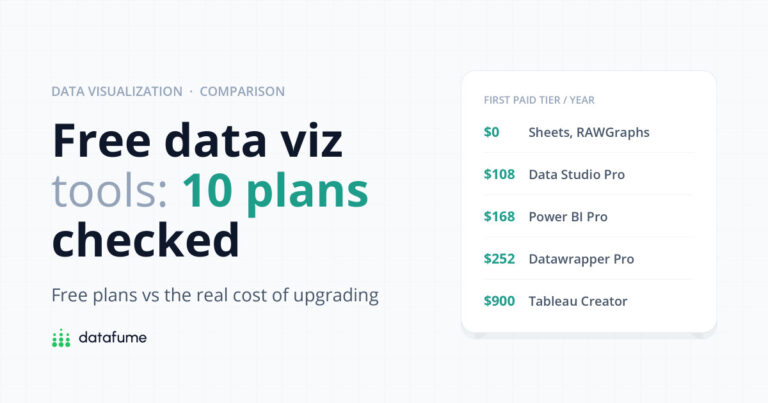
| Datawrapper Pro | $21 per user/month, billed annually, excl. VAT | No attribution, SVG and PDF export, 90-day edit history |
| Datawrapper Business | $39 per user/month, billed annually, excl. VAT | Waterfall and dual-axis charts, team permissions, priority support |
| Datawrapper Enterprise | Quote | SAML/OIDC single sign-on, self-hosting of published charts, uptime SLA |
| Flourish Free | $0 | All templates, public publishing with attribution |
| Flourish Presenter | Included with Canva Business or Enterprise | Flourish charts in Canva and PowerPoint, image and SVG export |
| Flourish Publisher | Quote | No attribution on websites, teams, scrollytelling, live data, HTML export, one custom theme |
| Flourish Enterprise | Quote | SSO, multiple themes, API, account manager |
Datawrapper’s pricing page also offers monthly billing, a 20% discount for non-profits and academic researchers, and custom brand themes as an add-on (from $499 a month for the first theme). Flourish says its premium plans are “handled through custom contracts and invoicing”, so you will need to talk to sales for Publisher. If your organisation already pays for Canva Business, check whether you have Flourish Presenter before buying anything else.
Datawrapper covers the charts most reports actually need: bar, stacked and grouped bars, columns, lines, areas, scatter plots, dot and range plots, arrow plots, pies and donuts, plus excellent responsive tables (with sparklines, heatmap colouring and search). Its maps come in three kinds: choropleth maps (shaded regions), symbol maps (sized circles) and locator maps (a pin on a place). It ships with a large library of boundary files, and you can upload your own GeoJSON or TopoJSON.
Flourish offers 50+ templates. Alongside standard charts you get things Datawrapper does not do: bar and line chart races, survey and Sankey charts, network graphs, hierarchy charts, card grids, 3D globes and connection maps. Its maps include shaded projection maps and point maps, and it can show change over time inside a map. If your chart needs to tell a story frame by frame, Flourish has a template for it.
This is the clearest difference. Flourish is built for motion. Its bar chart race template is the reason many people sign up: upload one row per item and one column per time period, and it animates the ranking. Flourish stories (available on the free plan) let readers click through a sequence of chart states with captions, much like slides. Scroll-driven scrollytelling is listed as a Publisher-plan feature.
Datawrapper has almost no animation. For a report, a dashboard-style article or a press release, that is a feature, not a bug: static charts are easier to read, print and screenshot.
If your organisation has accessibility obligations, Datawrapper is ahead. Its colour-blind check warns you when some readers will not be able to tell your colours apart, and lets you preview the chart through different types of colour blindness. In the Annotate tab there is a field for an alternative description for screen readers, and readers can be offered a “Get the data” link. Its Academy has detailed guidance on writing good alt text.
Flourish has improved: each visualisation includes a screen-reader description, titles and annotations are read out, data points can be navigated by keyboard, and labels get automatic contrast. Its accessibility page does not mention a colour-blind checker, so you will need to test colours yourself. Our guide to data visualisation mistakes covers colour choices that work for everyone.
Most people make a publishable Datawrapper chart in their first ten minutes. The four-step flow (upload, check, visualise, publish) is hard to get lost in, and the defaults are sensible. Flourish is still beginner-friendly, but every template has its own long settings panel, and getting animations and stories right takes practice. Flourish now includes an AI assistant that helps adjust charts with plain-language prompts, with larger allowances on paid plans.
Datawrapper includes a shared team workspace even on the free plan, so a small team can keep charts in one place. Business adds fine-grained permissions. In Flourish, team features (shared folders, access controls and approval workflows) start at Publisher.
Datawrapper states that it is hosted in Frankfurt, Germany, and Stockholm, Sweden, so user data stays in the European Economic Area. Published charts are served through a global CDN for speed. Its embeds set no cookies and do not track readers, and IP addresses are processed but not stored, which is useful if you are trying to keep a website cookie banner short.
Flourish says it is ISO 27001 certified, offers SSO and session controls on Enterprise, and keeps unpublished projects private. Its pricing page does not say where data is hosted, so if data residency matters to you, ask Flourish’s sales team before you commit. If you are weighing up cloud risks more generally, see is cloud storage safe?
Decision guide
Four questions to pick the right tool
Start at the top. Stop at the first yes.
| Your situation | Our pick |
|---|---|
| Blog or news site publishing charts every week | Datawrapper |
| Annual report, policy brief or PDF | Datawrapper (Pro for SVG/PDF) |
| Choropleth map of countries, regions or districts | Datawrapper |
| Public sector or charity with accessibility duties | Datawrapper |
| Social video or “who led each year” ranking | Flourish (bar chart race) |
| Interactive explainer or step-by-step story | Flourish |
| Team already on Canva Business | Flourish (Presenter is included) |
| Unsure, and on a zero budget | Datawrapper first, Flourish for the odd animated piece |
Plenty of teams use both: Datawrapper for the everyday charts that fill a report, Flourish for the one animated piece that gets shared. If you are still deciding between dashboard tools rather than chart makers, our Looker Studio vs Tableau Public comparison covers that side.
Yes, Flourish has a free plan with unlimited projects and all templates. The limits are that published work is public with Flourish attribution, there are no image or HTML downloads, and others can duplicate your public projects. Paid plans remove those limits.
Yes. Datawrapper’s free plan lets you create, publish, embed and download PNGs without limits, including on commercial sites. The trade-off is the “Created with Datawrapper” credit and no SVG or PDF export.
Only on a paid plan. Datawrapper removes attribution from Pro ($21 per user per month, billed annually, as of October 2026). Flourish removes it on websites from the Publisher plan, and in Canva and PowerPoint from Presenter.
For standard shaded or symbol maps, Datawrapper is quicker and its maps are clearer and more accessible. Flourish is better for animated maps, 3D globes and connection or flow maps.
No. Datawrapper does not offer animated race charts. Flourish’s bar chart race template is the most popular no-code option for that.
Datawrapper charts can be downloaded as PNG on the free plan (and SVG or PDF on Pro) and pasted in. Flourish Presenter adds interactive charts to PowerPoint and Canva. If you only need a quick map inside a spreadsheet, see our guide to making a map chart in Excel.
Datawrapper is the better everyday tool: fast to learn, generous for free, strong on accessibility and clear about pricing and hosting. Flourish is the better show-stopper: when a chart needs motion or a story, nothing else this easy comes close. Pick by the job in front of you, not by the logo.
Want charts people trust? Read our guide to 10 data visualisation mistakes that make charts misleading, find practice data in free datasets for data analysis, and see why clear charts matter in what is data literacy.
Keep reading
Short, free guides that take you from zero to your first real analysis. No sign-up needed.

Join our newsletter for new data guides, tool reviews and free resources.
By subscribing you agree to our Privacy Policy and consent to receive emails from DataFume.
© 2026 DataFume. All rights reserved.